Node-RED#
Node-RED is a flow-based, low-code development tool commonly used in IoT and industrial automation. It allows users to connect data sources, processing nodes, and outputs using a visual editor, making it ideal for rapidly building streaming pipelines without writing extensive boilerplate code.
In the STAMM demo, Node-RED acts as a data replay service: instead of directly connecting to a physical bioreactor, it replays historical trajectories from IndPenSim and publishes them as time-series data, so that STAMM receives them as if they were coming from a live penicillin fermentation.
Node-RED data replay service#
The Node-RED flow used in this demo:
Loads pre-recorded fed-batch trajectories from IndPenSim (CSV files such as
batch2.csv,batch15.csv,batch60.csv,batch86.csv,batch91.csv, …).Parses each row and converts the columns into standardized observations.
Streams measurements into InfluxDB 2.7 using a unified schema:
measurement:device_obsTags:
device_id,project_name,batch_id,sourceFields:
observed_property,value
From the perspective of the time-series database, workflow engine, and dashboards, this virtual data stream is indistinguishable from a real bioreactor publishing online sensor data.
Node-RED dashboard#
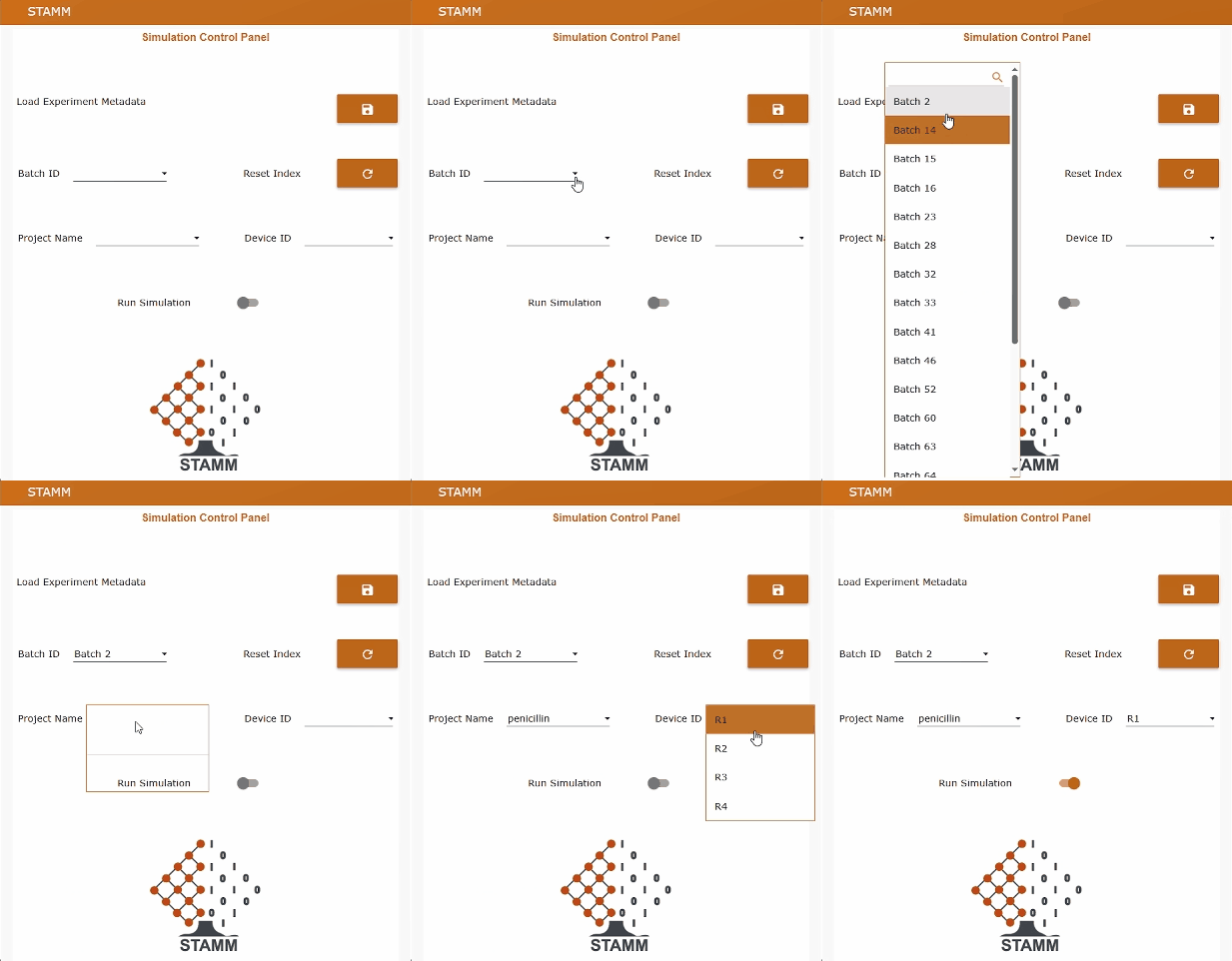
The Node-RED dashboard exposes an operator-friendly UI that allows users to:
Select a batch file (e.g.
batch2.csv,batch15.csv,batch91.csv).Choose the project name (e.g.
penicillin,pichia,ecoli).Choose the device ID (e.g.
R1–R4).Start or stop the real-time data replay.
Reset the internal row counter and timestamps.
Trigger a metadata bootstrap that populates the
stamm_metadatabucket with human-readable labels, units and recommended precision for each process variable.
Every few seconds (by default, every 20 s), the data replay service sends the next row of the selected batch, preserving the original dynamic profiles and relative timing. This makes it possible to test the whole STAMM stack—time-series storage, soft sensors, and dashboards—without needing physical access to a 100 m³ bioreactor.
How to deploy the Node-RED service (Docker-based)#
The Node-RED data replay service is distributed as a Docker-based stack that can run on its own or alongside a full STAMM deployment.
Requirements
Docker and Docker Compose installed
A running InfluxDB 2.7 instance (local or remote), with buckets such as
stamm_rawandstamm_metadata
Environment configuration
In the Node-RED simulator repository (e.g.
penicillin_nodered), copy.env.exampleto.envand set:# Node-RED NODERED_PORT=1880 # InfluxDB INFLUX_BASE_URL=http://influxdb:8086 INFLUX_ORG=stamm INFLUX_BUCKET_RAW=stamm_raw INFLUX_BUCKET_META=stamm_metadata INFLUX_TOKEN=YOUR_INFLUXDB_TOKEN_HERE # Default tags for the data replay DEFAULT_PROJECT_NAME=penicillin DEFAULT_DEVICE_ID=R1 DEFAULT_BATCH_FILE=batch2.csv STREAM_INTERVAL_SECONDS=20 ---
Explore the source code and contribute on GitLab:
